Category: Zoho CRM, AI, and integrations
Author: AorBorC Technologies
Published: July 24, 2026
Turning a table into CRM rows solves data entry. It does not decide whether those rows are safe to use.
Zoho announced on July 23 that Zia Vision's intelligent character recognition, or ICR, can recognize tabular values in an uploaded image and place them into Zoho CRM subforms.
A subform is the repeating table inside a CRM record: employment history under an application, dependants under an insurance record, assets under an inspection, or other rows that belong to one parent record. This release extends Zoho's field-prompting workflow from general CRM fields to tabulated subform fields, moving ICR closer to operational document intake.
That is useful progress. It also moves the control problem downstream. Once extracted rows can influence a quote, order, product record, inventory decision, finance handoff, or customer workflow, the question is no longer only whether the text was recognized. Teams must decide which rows are accepted, who reviews them, how exceptions are corrected, and when another system is allowed to act.
AorBorC's view: every extracted row is unverified intake until an accountable reviewer accepts it.
What Zoho announced
Zoho's announcement says ICR can extract table cells and store them as subform values. It says a rule can use up to three subforms and 20 fields overall, with advanced extraction prompts available for selected fields.
The same announcement lists Professional, Enterprise, and Ultimate editions. Its rollout wording needs care: the post lists availability in the US, India, and European Union data centres, while also saying the release has reached organisations in the US and India data centres. Verify the feature in the target account, edition, data centre, and layout before committing to a production plan.
Zoho's ICR knowledge-base page now documents table-to-subform extraction for zero-shot field prompting. It also draws two important boundaries. Template-driven extraction cannot currently train tables in a sample file for association with a subform. When an existing record is enriched from an import image, extracted subform rows are added to existing line items rather than replacing them.
That makes extraction mode, duplicate control, and correction handling part of the pilot. Confirm the enabled mode and its behaviour in the actual account, then design around observed evidence rather than a headline.
The current ICR help page lists JPG, JPEG, and PNG for field prompting. It also requires the user to review Zia's associations, keep or remove values, and correct inconsistencies before proceeding. Do not expand that into a promise about PDFs, multi-page documents, straight-through processing, or a universal accuracy level. Zoho lists handwritten text as supported but publishes no accuracy guarantee that applies to every document.
Zoho says the ability to extract fields of different data types is coming "very soon" and presents invoices-to-quotes and receipts-to-inventory as future examples. Those examples are direction, not capabilities to promise today. The released capability extracts values into CRM fields and subforms; it does not claim to create or post quotes, orders, inventory movements, or finance transactions.
Why table rows change the risk boundary
A single wrong name or phone number creates one correction. A wrong table can create many structured errors at once.
Consider a document with product-like rows. The extractor may need to distinguish a SKU from a description, a unit price from an extended amount, or an ordered quantity from a delivered quantity. A repeated page header can look like another row. A blank cell can shift values into the wrong columns. The same document uploaded twice can create duplicates. A valid-looking item description may still fail to match the governed catalog record used by Shopify, Zoho Books, Odoo, or another ERP.
The safe operating path is:
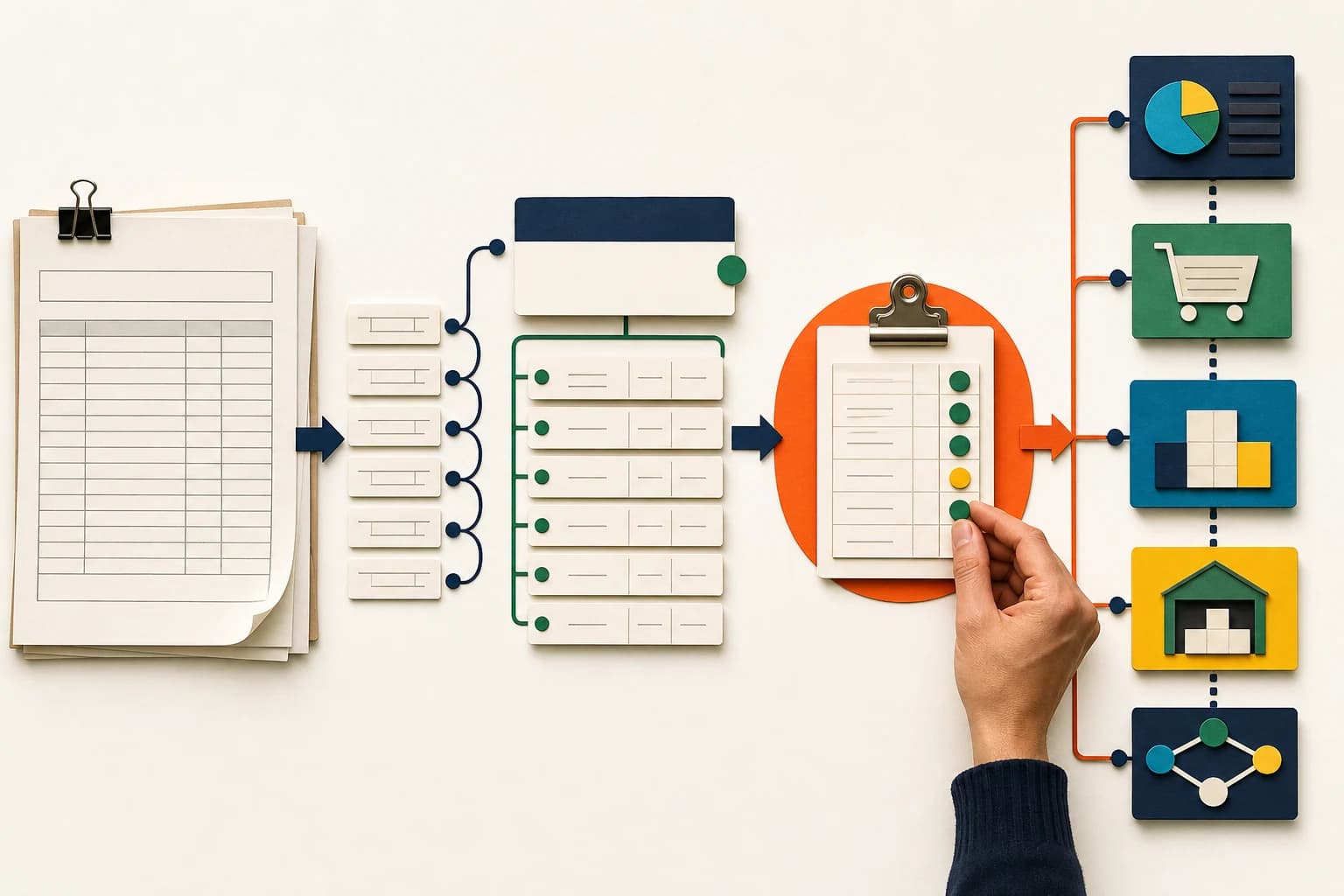
Source image → extracted parent fields and rows → human review → approved CRM record → controlled integration → downstream reconciliation
The approval boundary matters. CRM can be the intake and review layer without becoming the source of truth for every product, price, tax, inventory, or accounting field. If Odoo owns inventory and procurement, Zoho Books owns finance, or Shopify owns the customer-facing catalog and checkout, the integration should translate approved rows into governed identifiers and preserve a trace back to the source document.
Without that boundary, document AI can turn a scanning shortcut into catalog drift, duplicate orders, incorrect stock movements, finance cleanup, or reports that cannot be reconciled.
Choose the first pilot carefully
Start with a repeating table whose business meaning is clear and whose downstream consequence is limited.
Good early candidates can include application histories, dependant lists, equipment registers, inspection items, service-request rows, or structured onboarding details. These still need privacy, permission, and validation controls, but a reviewer can usually compare each row with the source before approval.
Avoid beginning with the most financially sensitive document merely because it has the largest typing burden. Invoices, receipts, purchase orders, catalog imports, and stock documents combine row extraction with product identity, units, price, currency, tax, totals, duplicate detection, approvals, and posting rules. They can be valid later-stage use cases, but only after the intake and review path is stable.
Implementation checklist
Use this checklist before allowing extracted subform rows to trigger a live workflow.
- Confirm availability in the real account. Check the edition, data centre, account rollout, module, layout, extraction mode, supported input type, and the July 23 limits in an isolated test setup with downstream actions disabled.
- Define the parent and row schema. Name every parent field and subform column, its business meaning, data type, required state, allowed values, and downstream owner.
- Keep the source evidence. Retain the original image or an approved reference to it, the uploader, received time, extraction rule, review state, reviewer, corrections, and final decision.
- Create explicit intake states. Separate extracted, needs review, approved, rejected, and synced. Do not let "record created" mean "transaction accepted."
- Test representative difficult inputs. Include missing cells, repeated headers, merged cells, skewed or low-quality images, handwriting where relevant, unexpected row counts, extra notes, and documents that do not match the expected layout.
- Validate row identity and arithmetic. Check unique row keys where available, SKU or item mapping, units, quantities, currency, tax, subtotals, totals, and the relationship between the parent record and every row.
- Prevent duplicate processing. Define how the system recognizes a repeated upload, a corrected document, a retry, and a second version. Make retries safe so they cannot create duplicate downstream records.
- Route ambiguity to a named owner. Missing mandatory values, unknown products, invalid picklists, row-count differences, and total mismatches need a visible exception queue and a person responsible for resolution.
- Protect the downstream handoff. Send only approved rows. Map them to governed CRM, ERP, finance, e-commerce, or reporting identifiers, and retain request, response, failure, and retry evidence.
- Reconcile after integration. Compare the approved CRM rows with what arrived in Zoho Books, Odoo, Shopify, a custom ERP module, or another target. Preserve Zoho's validation step and accountable human approval before every downstream write.
Where the hype is not useful
This update does not establish an accuracy rate, remove the need for review, or make every document suitable for automation.
Table extraction is currently a zero-shot field-prompting capability. Template-driven extraction cannot currently train tables for subform association, and enriching an existing record adds rows rather than replacing its current line items. Choosing the wrong mode or retry design can therefore create missing or duplicate detail.
The announcement's ceiling of three subforms and 20 fields overall applies to each ICR rule. CRM subform configuration has separate limits: the current subform help page lists one subform per module in Professional, two in Enterprise, five in Ultimate, and a maximum of 25 subform fields per layout. Do not combine these limits or assume that every ordinary CRM field, validation, workflow, report, or API behaviour applies identically inside a subform.
Advanced extraction prompts can clarify what a field means. They do not establish product identity, tax treatment, credit approval, inventory availability, or accounting policy.
Most importantly, "AI extracted it" is not an audit trail. The operating system still needs the source, the proposed values, the corrections, the approver, the downstream result, and the exception history.
AorBorC's implementation view
AorBorC would begin with a document sample and the workflow that follows it, not with an automation toggle. We would classify the document variants, design the parent and row schema, define the human review screen and permissions, test failure cases, and map the approved handoff into CRM, Zoho Books, Odoo, Shopify, or another business system.
Zoho Creator can be a custom intake or exception-review layer when the standard CRM experience does not fit the operating process, but it is not automatically required. The useful architecture is the smallest one that keeps source evidence, decisions, retries, and ownership understandable after launch.
This is where AorBorC's founder-led Zoho and AI work meets ERP and e-commerce delivery: practical document intake, human-reviewed AI, catalog and order mapping, inventory and finance handoffs, integrations, reporting, and rescue audits when an existing workflow is already producing unreliable records.
Relevant service paths:
- AI solutions for document intake, review workflows, safeguards, and practical AI implementation.
- Zoho integrations for controlled CRM, finance, ERP, e-commerce, and reporting handoffs.
- ERP and Zoho solutions for approvals, master data, finance workflows, modules, and operational reporting.
Business takeaway
Zoho's table-to-subform announcement moves document AI from individual fields into repeating operational records. The value is real, but so is the control obligation: verify the rollout, treat every extracted row as unverified, require review before downstream action, and reconcile what the receiving system accepted.
If your team wants to test one document type without turning the pilot into a production incident, plan the intake and review workflow with AorBorC. Bring representative clean and difficult documents, the target CRM layout, the current manual checks, and one example of the ERP, finance, inventory, or e-commerce handoff that follows.