Category: Zoho Finance Operations
Author: AorBorC Technologies
Published: November 17, 2026
Zoho Books has made Networking available to all paid-plan customers in its India edition. Two connected Zoho Books organizations can now exchange supported transactions directly instead of emailing a file and asking the other team to enter it again.
That removes a frustrating handoff. It does not remove the controls around the handoff.
A direct transaction exchange can remove re-keying. It cannot decide whether the transaction is correct, authorized, unique, or fully reconciled.
The useful part of this release is not simply that a transaction moves between two systems. It is that Zoho Books keeps the incoming item separate until the receiving team reviews it. Operational leaders should preserve that boundary rather than automating past it.
What changed in Zoho Books
In its November 2026 product update, Zoho says Networking is now available to all paid-plan customers in the India edition.
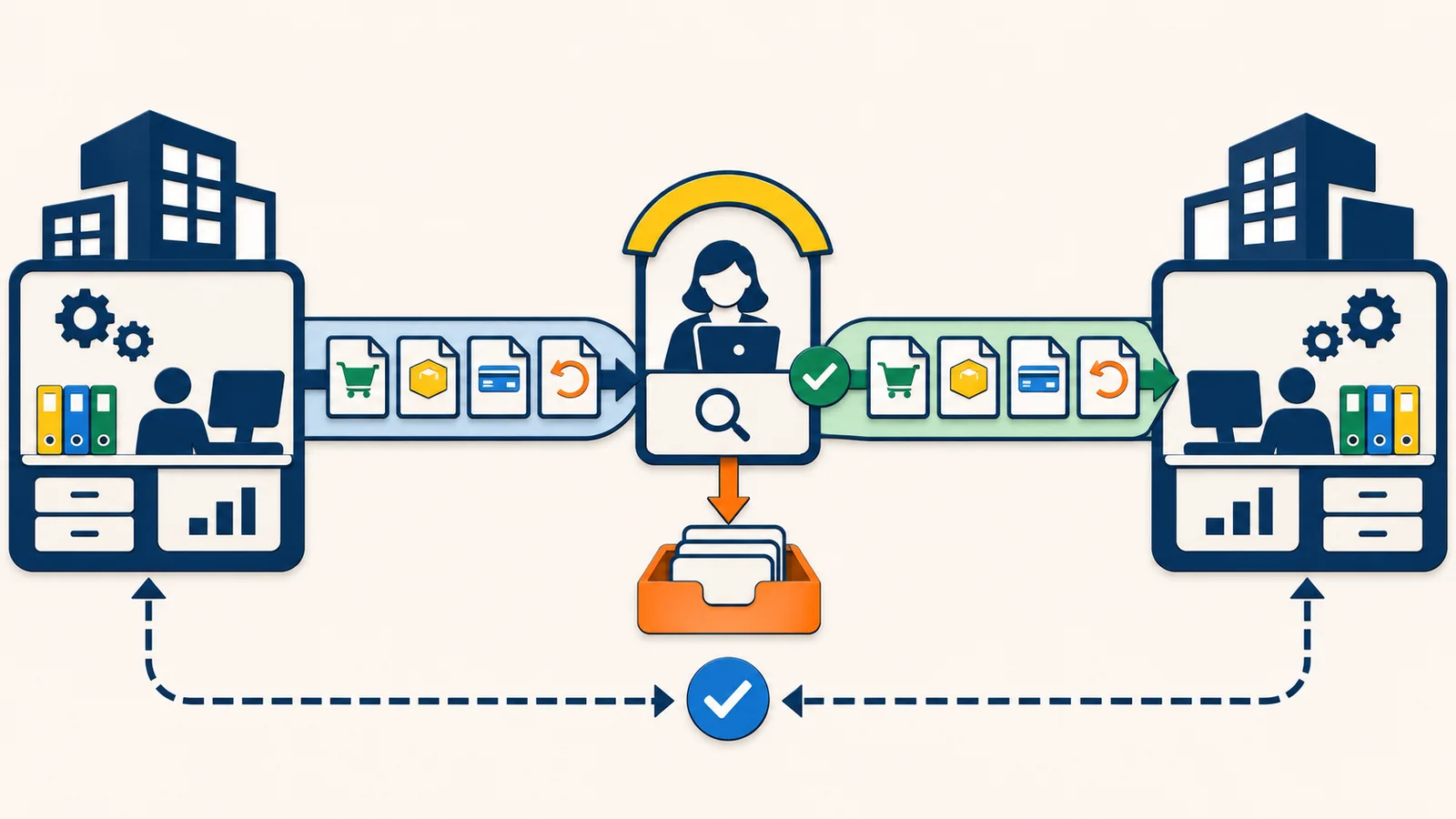
Each participating organization enables Networking and receives a unique Network Key. The two organizations exchange their keys and save them against the matching customer or vendor records. Zoho's help documentation is explicit that a Network Key identifies the organization; it does not give the other party access to that organization's data. Only transactions deliberately pushed across the connection are exchanged.
The sender can push these transaction types:
- Purchase orders
- Invoices
- Payments made
- Credit notes
The receiver reviews the corresponding sales orders, bills, payments received, or vendor credits in a dedicated Network tab. The incoming item does not join the regular transaction list until it is accepted. The receiver can inspect it, accept it and verify or change the new transaction before saving, or reject it with a reason. The sender can then see whether a transaction has not been pushed, is pushed and awaiting a response, was accepted or rejected, or failed to push. A rejected transaction can be corrected and pushed again.
This is a meaningful improvement over attachment-driven entry. It also creates a new operating boundary that needs named owners.
Why finance and operations leaders should care
Re-keying a purchase order, invoice, payment, or credit creates obvious opportunities for delay and error. Direct exchange reduces that work. But it does not make two organizations' master data, approval rules, tax treatment, fulfillment evidence, or period-close procedures identical.
The status words matter:
- Pushed means the transaction was sent to the connected organization. It does not mean the other side reviewed it.
- Accepted means the receiver accepted the network transaction and created the corresponding transaction in its organization. It does not prove that goods were received, an internal approval finished, a payment cleared the bank, or both ledgers reconcile.
- Rejected means the receiver declined the item and supplied a reason. It needs a correction owner, not an email thread with no system status.
- Push failed means the exchange itself did not complete. It needs a documented recovery and escalation procedure plus an exception queue.
This is the practical point: transport status is not business completion.
If teams collapse those meanings into one green tick, Networking can move a mismatch faster. If they keep the meanings separate, it can become a cleaner finance handoff with less entry and better exception visibility.
The operational system around the exchange
Networking covers a defined transaction handoff between two Zoho Books organizations. The surrounding operating system still has work to do.
| Area | What Networking can reduce | What the wider system must still control |
|---|---|---|
| Customer and vendor records | Re-entry between connected organizations | Correct legal entity, contact ownership, Network Key verification, tax and payment settings |
| Orders and procurement | Manual transfer of purchase orders into sales orders | Commercial approval, item mapping, quantities, prices, delivery terms, and change handling |
| Invoicing and payables | Manual transfer of invoices into bills | Purchase-order and receipt matching, tax review, due dates, coding, and payment approval |
| Payments and credits | Manual transfer of payment and credit information | Bank settlement, allocation, refund or credit approval, and ledger reconciliation |
| Inventory and warehouse | Earlier visibility of a commercial transaction | Actual receipt, pick, pack, shipment, returns, stock movement, and shortage exceptions |
| Reporting | Network statuses for pushed and received items | Exception ageing, close completeness, duplicate detection, and cross-system reconciliation |
For an e-commerce business, this boundary often sits beside Shopify, a warehouse process, a payment provider, and an ERP or finance ledger. Networking does not replace the catalog-to-checkout flow or the order-to-inventory handoff. It can improve one accounting exchange while the rest of the order lifecycle remains governed by separate systems.
For an Odoo or mixed-ERP environment, it is not a universal intercompany bus. If one party is not using Zoho Books, or if the workflow needs product-master synchronization, fulfillment events, custom approvals, or complex transformations, a designed integration may still be necessary.
An implementation checklist before connecting partners
1. Confirm the real scope
Verify that the feature is available in the relevant Zoho Books organizations and edition. This release is documented for the India edition. Both organizations must use Zoho Books, enable Networking, and exchange and save each other's Network Key before the connection becomes active.
2. Name the connection owner
Assign someone to verify the customer or vendor identity before saving a Network Key. Define who may add, replace, or remove a key and how the other party's identity is confirmed outside the transaction itself.
3. Map each transaction pair
Document what the sender creates and what the receiver receives: purchase order to sales order, invoice to bill, payment made to payment received, and credit note to vendor credit. For each pair, list the required fields, local defaults, and any receiver-side edits that are allowed.
4. Define status semantics
Write down what Pushed, Accepted, Rejected, and Push Failed mean to your team. Keep those statuses separate from internal approval, fulfillment, bank settlement, and reconciliation states.
5. Set the receiver's review standard
Before acceptance, require the receiver to compare the fields its process depends on: legal entity, date, currency, item or service, quantity, rate, tax treatment, branch or project, and payment terms where applicable. Do not assume that a technically valid transfer is commercially correct.
6. Preserve downstream approvals
Decide what happens after acceptance. A new bill may still need a purchase-order or receipt match. A sales order may still need credit or availability checks. A payment or credit may still need allocation and finance approval. Make those gates visible in the system rather than relying on memory.
7. Add duplicate and correction controls
If the exchanged record contains a reliable transaction identifier, include it with the source organization in a duplicate check. Otherwise, define a shared reference convention before rollout. Decide whether the receiver corrects an incoming item before saving or rejects it so the sender can correct and retry. Avoid two teams making different silent corrections to what they believe is the same transaction.
8. Build an exception queue
Give transactions that are pushed and awaiting a response, rejected, or failed an owner and review cadence. Track the reason, next action, and age of the exception. Zoho Books will show the network state; your operating process must decide when someone intervenes.
9. Reconcile the downstream records
Test that an accepted transaction reaches the intended approval, inventory, banking, reporting, and close processes. Reconcile a verified exchanged identifier or your shared reference convention to the receiver-side record and, where relevant, to goods receipt, shipment, bank settlement, or credit application.
10. Pilot the difficult cases
Start with a small partner set and test more than the happy path. Include a rejected transaction, a correction and retry, a failed push, an apparent duplicate, a changed price or quantity, a partial commercial outcome, and a period-close boundary. Record what the teams must do in each case.
Where the hype is not useful
Networking is not a reason to remove finance review. It is not proof that two organizations share the same data model. It does not replace warehouse evidence, bank reconciliation, approval authority, or a broader Shopify-to-ERP integration.
It is also not a feature to describe as universally available without qualification. Zoho's November announcement is specifically labelled for the India edition. Teams in other editions should check their own product documentation and tenant before planning around it.
The right promise is smaller and more valuable: fewer files to send, fewer details to re-enter, and a structured accept-or-reject boundary between connected Zoho Books organizations.
How AorBorC would implement it
AorBorC would treat Networking as one controlled handoff inside a longer operational system. The work starts with the transaction and authority map: who owns the connection, what the receiver validates, what approval follows acceptance, how exceptions return to the sender, and how both sides prove the records eventually match.
That may sit inside a broader Zoho and ERP implementation, require purpose-built Zoho integrations, or expose a missing control that belongs in an ERP module. The implementation should fit the actual order, procurement, inventory, finance, and reporting workflow—not stop at enabling a feature.
Business takeaway
Use Zoho Books Networking to reduce manual re-entry. Keep identity checks, receiver review, downstream approval, exception ownership, and reconciliation firmly in place.
If your team wants to map the transaction flow before connecting organizations, plan the workflow with AorBorC. Bring one real purchase-to-pay or order-to-cash path; we will identify the handoff, control points, exceptions, and system owners before implementation.