Category: Shopify, E-commerce Security & Integration Operations
Author: AorBorC Technologies
Published: November 13, 2026
Shopify has started enforcing IP allowlists for public apps and has published a separate schedule for custom apps installed on stores outside the organization that owns the app. The first deadline has passed: since November 12 at 11:59 PM ET, public-app bulk queries and mutations without an allowlist are blocked.
That does not mean every Shopify integration or storefront stops today. The consequence depends on the app type, the API call, and the date.
A network security rule becomes an operations control when one missed request source can leave two business systems disagreeing.
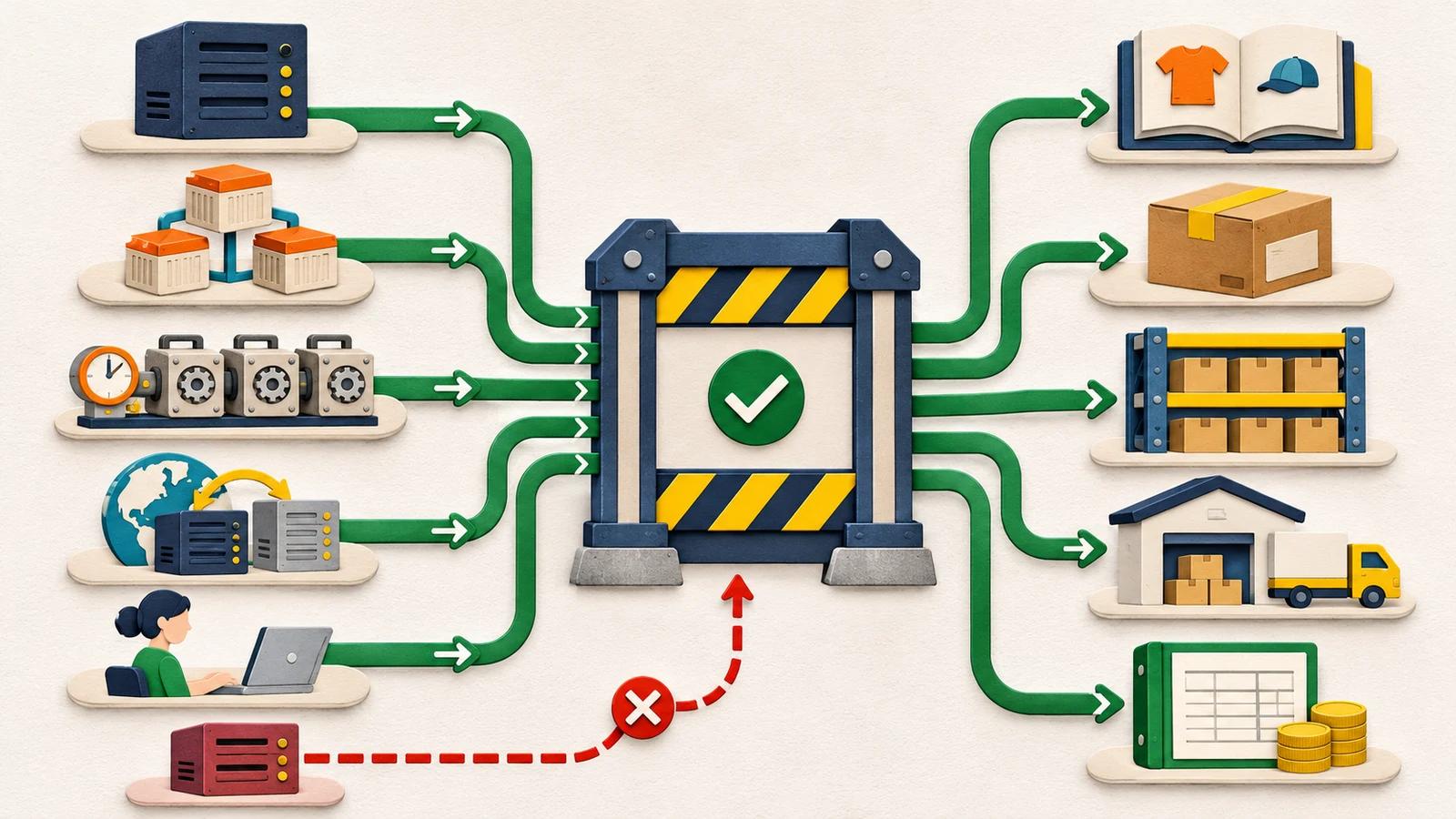
The useful response is not to paste one production IP address into a settings screen. It is to map every place that sends Shopify GraphQL or REST Admin API requests—the interface an integration uses to read or change store data—test the expected paths, prove in a development or test store that an outside path is rejected, and prepare safe replay and reconciliation before enforcement exposes a gap.
The 60-second applicability check
Start by asking the app owner which row applies. A public app is owned and distributed by an app provider to multiple merchants, commonly through Shopify's App Store; ask the vendor to confirm the app type. A cross-organization custom app here means a custom app installed on a store outside the organization that owns the app; these are often partner-owned. Apps created by a merchant in Shopify admin or the Dev Dashboard are a different category.
| App category | Documented consequence | What to do now |
|---|---|---|
| Public app — bulk operations | Since November 12, 2026 at 11:59 PM ET, bulk queries and mutations are blocked without an allowlist. | Check the last successful bulk import, export, or update; configure and test the allowlist; reconcile any missed work. |
| All public apps — distribution and later enforcement | On November 20, 2026 at 11:59 PM ET, a public app without an allowlist is delisted, blocked from new installs, and flagged to merchants in Settings > Apps. Shopify lists a separate merchant warning on January 15, 2027 and Admin API rejection on April 1, 2027 for remaining existing installs. | Configure and test before November 20, without presenting that date as a universal runtime shutdown. |
| Custom app installed outside its owner's organization | New cross-organization installs require an allowlist from November 20, 2026 at 11:59 PM ET. Existing cross-organization installs require one from January 1, 2027 at 11:59 PM ET. | Inventory every affected app across every client store, name its owner, and test each request path before the applicable milestone. |
| Same-organization custom app or merchant-created app | The cross-organization custom-app requirement does not apply to apps installed only within their owner's organization or to apps created by merchants in the Dev Dashboard or Shopify admin. Shopify still recommends an allowlist. | Record why the app is outside the mandate instead of assuming every custom app has the same deadline. |
The November 20 deadline is important, but it is not a storefront shutdown. For an existing public-app install, ordinary Admin API calls are not universally rejected on that date. The only deadline-triggered runtime failure already documented here is narrower: public-app bulk operations without an allowlist. Separately, when an app's allowlist enforcement is enabled, Shopify rejects an Admin API request from an unlisted or unconfirmable source.
What the allowlist actually controls
When enforcement is on, Shopify checks the source of GraphQL and REST Admin API requests made with the app's access tokens, which are the app's credentials. A request from outside the configured IP addresses, CIDR ranges—a defined block of IP addresses—or allowed networks receives a 403 response—plainly, Shopify rejects the API request.
Shopify now lets an app combine up to 250 IP addresses or ranges with up to 10 autonomous system numbers, or ASNs. An ASN identifies a hosting provider's network. It helps when a serverless or other dynamic platform cannot promise one fixed outgoing IP address, but it is a broader control: other customers also use that provider network. Shopify recommends specific IP addresses where possible and allows countries to narrow an ASN rule.
This distinction matters because a typical commerce integration has more than one request path:
- the main application server;
- scheduled catalog, price, or inventory jobs;
- a queue worker that creates or updates orders;
- a bulk import or export process;
- a serverless function with dynamic outgoing addresses;
- a regional deployment or disaster-recovery path;
- a support or migration tool operated by a person; and
- a third-party service that has been given the app's token.
Checking only the main web server can produce a clean recent-traffic test while a quarter-end export, seasonal catalog job, disaster-recovery path, dormant migration tool, or newly provisioned worker remains outside the list.
Why operational leaders should care
An API security control can fail as an operations problem before anyone calls it a security incident.
Imagine that a scheduled inventory export uses a bulk query from a worker nobody added to the allowlist. The storefront remains online. Customers can still browse and place orders. The export returns 403, so the ERP—the finance or operations system—or warehouse system keeps yesterday's availability. Retrying that rejected Shopify request does not itself duplicate an update. Duplicates become possible only if another step already changed the ERP, warehouse, or queue and the team cannot prove which steps completed. If the job simply stops, overselling, purchasing, support, and finance reports can drift apart.
The same pattern can affect:
- Catalog and checkout readiness: product, variant, price, metafield, and publication jobs can stop updating connected systems.
- Orders and fulfilment: an order import, fulfilment update, tracking write, or returns process can miss work while the storefront appears healthy.
- Inventory and warehouse operations: availability, transfers, reservations, and stock corrections can become stale across Shopify and ERP.
- Finance: refunds, fees, payouts, tax details, invoices, or settlement records can arrive late or need controlled replay.
- Support and reporting: teams may act on incomplete order or customer context unless failures are visible and reconciled.
The control is therefore part of the integration contract. It needs an owner, evidence, monitoring, recovery, and a definition of financial or operational closure.
Build an API request-path and recovery register
For each app and store, keep one compact register with:
- app name, app type, owner, and store or organization boundary;
- Admin API purpose and whether the path uses bulk operations;
- business process, operational criticality, maximum tolerable delay, and approved manual fallback;
- every server, worker, tool, region, or third party that sends requests;
- static IP or CIDR evidence, or ASN and country limits where dynamic addresses are unavoidable;
- applicable deadline and allowlist status;
- last positive test and deliberate outside-list rejection test;
403alert owner and first response;- replay method, duplicate-control rule, and rollback step; and
- reconciliation owner for catalog, orders, inventory, fulfilment, returns, and finance.
That register remains useful after the deadline. It supports token rotation, incident response, vendor offboarding, failover testing, and rescue work on inherited integrations.
A ten-step implementation checklist
Classify every app before changing settings. Record whether it is public, installed outside its owner's organization, same-organization custom, or merchant-created. Tie one documented consequence and date to that category. Artifact: app applicability register. Owner: platform owner.
Name the business workflows behind each token. Map the token to catalog, order, inventory, fulfilment, return, finance, support, or reporting work. Do not let a technical credential hide the business process it can interrupt. Record how long that process can remain blocked before a manual fallback or escalation becomes necessary. Artifact: token-to-workflow map. Owner: process owner.
Inventory every Admin API request source. Include web services, queues, scheduled jobs, bulk workers, serverless functions, CI or migration tools, operator laptops, regions, network address translation gateways, failover systems, and third parties. Artifact: request-path inventory. Owner: integration lead.
Collect evidence beyond the recent-traffic test. Shopify can test the configured list against recent traffic from the previous 30 days, but a quarter-end, seasonal, disaster-recovery, dormant migration, or newly provisioned path may not appear. Compare platform logs, deployment configuration, scheduler definitions, and vendor documentation. Artifact: source evidence pack. Owner: infrastructure owner.
Choose the narrowest workable rule. Prefer specific public IP addresses or CIDR ranges. Use an ASN only where dynamic outgoing addresses require it, and limit it to the countries in which the app actually runs. Record why a broader network rule was necessary. Artifact: approved rule set. Owner: security reviewer.
Test every path before its applicable milestone—or immediately for public-app bulk operations already under enforcement. Send a harmless, authenticated Admin API request from each production, scheduled, bulk, regional, and recovery path. Include low-frequency jobs instead of accepting a green dashboard as complete coverage. Artifact: path-by-path test record. Owner: QA lead.
Prove rejection as well as success. In a development or test store, use a controlled test credential to make a request from outside the list and confirm the expected
403. Never move a production token onto an unmanaged machine. Confirm that monitoring identifies the app, store, request path, operation, and owner without logging access tokens. Artifact: negative-test evidence. Owner: security and support leads.Test the business failure, not only the HTTP status. For each in-scope workflow class, safely block one synthetic transaction or job in a development or test tenant, or use approved non-production records. Do not pause live catalog, order, refund, inventory, or finance flows. Verify the alert, queue state, visible exception, expected customer or business impact, and handoff to the correct owner while keeping real customers unaffected. Artifact: exception runbook. Owner: operations support.
Make replay safe. Use stable business identifiers and duplicate controls so a retry does not create a second product update, order, shipment, refund, stock movement, invoice, or ledger entry. A returned
403means Shopify rejected that request; the remaining question is whether earlier or later steps changed the ERP, warehouse, finance system, queue, or another record. Treat timeouts separately because they can leave the Shopify outcome unknown. Artifact: replay and idempotency rules. Owner: application architect.Reconcile and approve the release. Compare Shopify with the catalog, ERP, warehouse, finance, and support systems after testing or any enforcement incident. Resolve missing, duplicated, stale, and unmatched records. A named human approves the evidence and recovery path before enforcement is treated as complete. Artifact: reconciliation report and release decision. Owner: business system owner.
Limits and places the headline does not apply
An IP allowlist reduces where a stolen token can be used. It does not replace narrow API scopes, expiring tokens, credential rotation, monitoring, secure storage, or incident response.
An ASN is not the same as one trusted server. It can include a hosting provider's wider network. Use it only when dynamic outgoing addresses make specific IP rules impractical, and apply the documented country limits where they fit.
Shopify also documents compatibility boundaries. It cannot confirm the source address for access tokens used by Shopify Flow's Send HTTP request action or for GraphQL Admin API requests made from an Oxygen-hosted storefront, so those patterns are rejected when the control applies. Shopify lists dev-preview requests on dev stores, and direct Admin API access from embedded pages and POS UI extensions, as exceptions that are not rejected in the same way.
This article is about outbound Admin API requests made with app tokens. It is not a claim that inbound webhooks, the Storefront API, customer account traffic, checkout, or the storefront itself are all governed by this one setting.
AI can help group logs or flag an unexpected request source, but it should not approve a broader network rule or replay consequential orders, refunds, inventory, or finance work without a named reviewer.
The AorBorC view
AorBorC treats the allowlist rollout as an inherited-integration continuity review. The founder-led approach in our company profile starts with the workflow and evidence: identify who owns the app, map where business requests originate, test the exceptions, and leave the client with a supportable register and recovery path.
For Shopify and e-commerce store development, that means the storefront, app, catalog, checkout, and launch work must connect cleanly to the operation behind them. When Shopify feeds an Odoo implementation or another ERP, order imports, stock publication, fulfilment, returns, payouts, and finance reconciliation need the same blocked-call, replay, and closure tests.
Business takeaway
Treat every Shopify Admin API request source as part of the integration contract. If the team cannot name its owner, allowed network, failure signal, replay rule, and reconciliation path, enforcement is not release-ready.
Your next move
Ask each Shopify integration owner for five things today: the app category, every place that sends Admin API requests, current allowlist status, the last successful positive and negative test, and the owner of replay and reconciliation. If those answers are incomplete, plan an e-commerce integration continuity review with AorBorC around one high-value catalog, order, inventory, or finance path.
Sources checked
Checked November 13, 2026.
- Shopify developer blog: App security updates—IP allowlist is now required
- Shopify developer changelog: IP allowlists are now required for custom apps installed outside your organization
- Shopify developer changelog: App IP allowlists now support IP addresses and ASNs together
- Shopify developer documentation: Restrict API access with an IP allowlist